Give Your Site an Address
Give Your Site an Address
Want your site at your own name, like yourname.com? Find one, buy it, and connect it without leaving moss.
Your site already lives online. This page gives it your own address, so people reach it at a name you choose instead of a longer default one. moss helps you find a name, buy it, and set it up.
A moss subscription is required to buy an address. moss will let you know if you don't have one yet.
Find a name
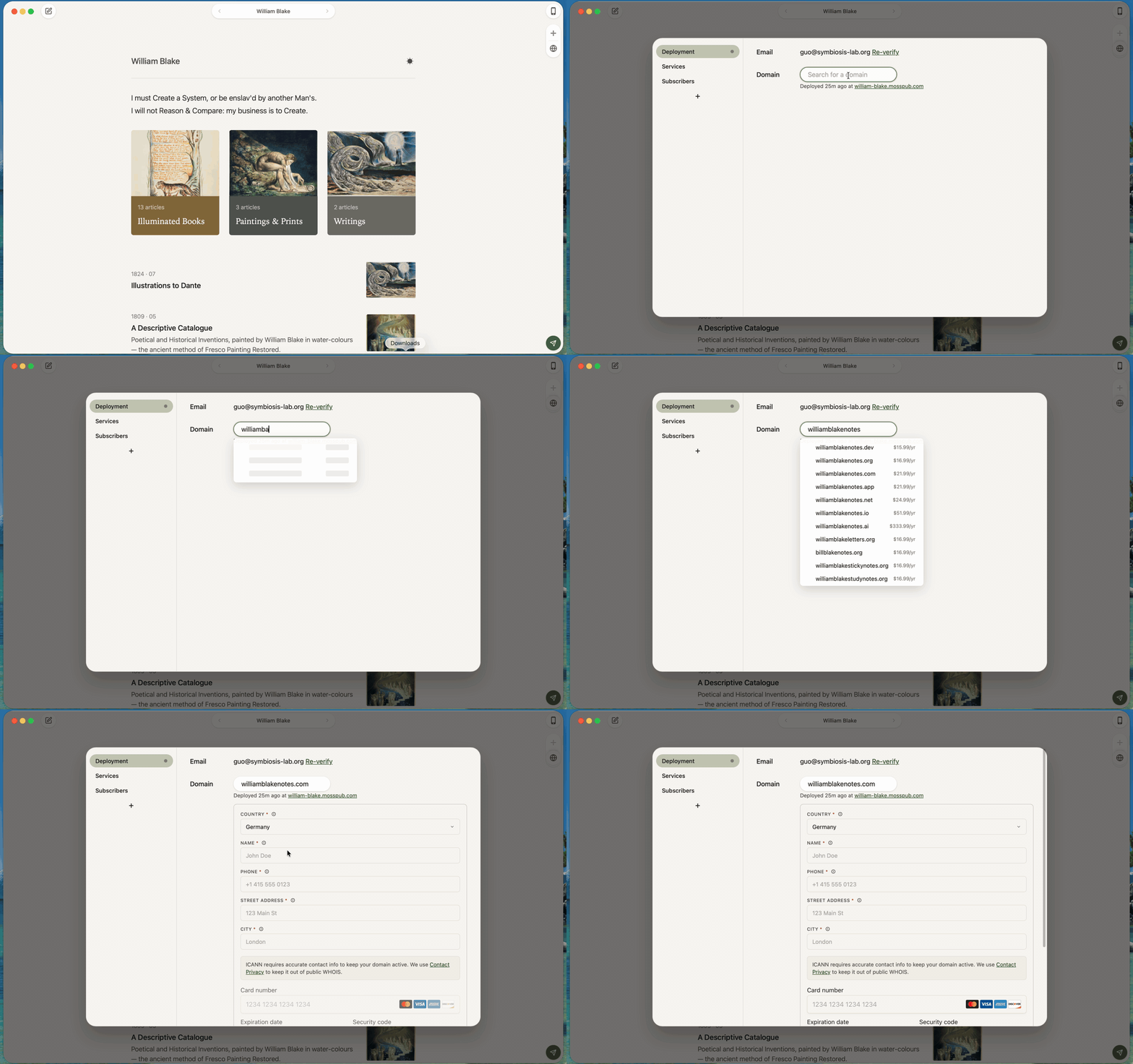
1. Open settings. In settings, open the Deployment tab. You'll see a Domain row.
2. Search. Click the Domain box and type the name you want. A list opens grouped into YOUR DOMAINS, EXACT MATCH, AVAILABLE TO PURCHASE, and TAKEN. Names you can buy show a price. Names already owned are marked taken.
3. Pick one. Click a name that's available. A short checkout opens right below it.
If you've already bought an address through moss, use the footer link Already purchased a domain? Verify your email to see them. Verify your email, then it appears under YOUR DOMAINS.
Buy it
A verified email is required. If you haven't verified yet, moss shows Please verify your email above before purchasing a domain. Verify it in the row just above, then come back.
1. Fill in your details. Enter Country, Name, Phone, and Street address. Outside the US, also enter a City. ICANN requires accurate contact info to keep your domain active; moss turns on Contact Privacy so your details are not published in WHOIS.
2. Add a card. Enter your card. It will be saved for future renewals and purchases; you can change it any time.
3. Buy. Click the button, which reads Buy for the price. It shows Processing... while it works. To stop, click Cancel.
Watch it come online
After purchase, moss sets everything up and shows a panel under the Domain box. At the top it reads Setting up HOST · usually ready in a few minutes (HOST is your new address). A few steps move from waiting to done:
- Domain registration
- Public DNS for HOST
- Certificate for HOST
- Site reachable at HOST
This usually takes a few minutes. moss checks on its own. When everything is ready, the panel reads HOST is live and a Visit HOST button appears.
If it's slow, moss shows Taking longer than usual and keeps trying. If something doesn't finish, you'll see Cannot reach HOST, with Recheck to try again or Dismiss to close the panel. If your connection drops, moss shows Your network seems offline. We'll keep trying once it's back. and resumes on its own.
Once live, the Domain row shows Deployed with how long ago. Your old address continues to redirect, so older links keep working.
Next
That's the whole track: your writing is online, at your own address, and shared where your readers are. To revisit publishing, see Import from Matters, or set up your Send a newsletter.